Open source CI/CD dashboard
All your CI/CD pipelines in one dashboard
Pipedash polls GitHub Actions, GitLab CI, Bitbucket, Buildkite, Jenkins, Tekton and ArgoCD and shows every pipeline in one place. Trigger, rerun and cancel without opening another tab.
What it does
Everything the dashboard shows comes from the provider APIs. Nothing leaves your machine except those calls.
One view for every provider
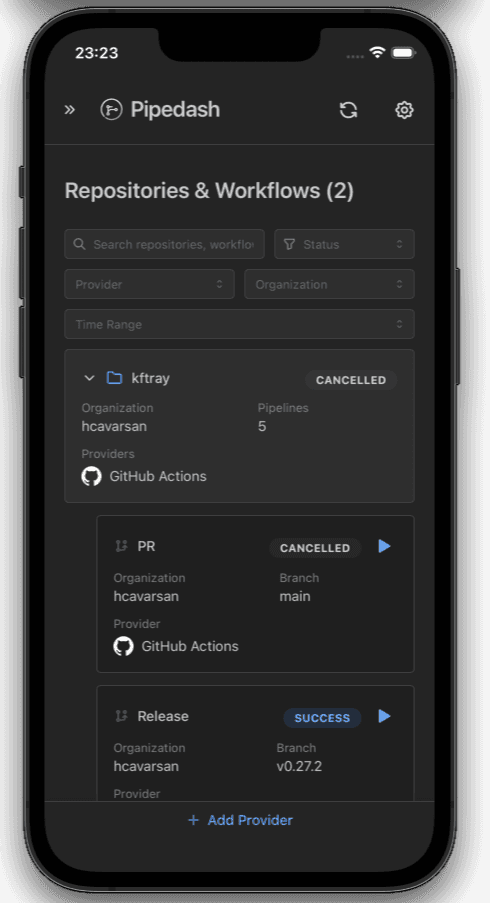
Pipelines group by repository and workflow across all providers. Filter by status, provider, organization or time range.
Adaptive refresh
Polling starts at 10 seconds and backs off to 5 minutes while nothing changes. Any change resets it and updates the view.
Trigger with parameters
Pipedash loads workflow inputs, pipeline variables or job parameters from the provider and shows them as a form.
Run history and rerun
Browse runs with commit, branch, actor and duration. Rerun any run with the same inputs.
Cancel from the dashboard
Every provider plugin implements cancel. When you add a provider, Pipedash checks the token and lists which actions it allows.
Build metrics
Run duration, success rate and run frequency per pipeline, aggregated by hour, day, week or month with P95 and P99.
Tokens stay on your machine
System keyring on desktop, or AES-256-GCM with an Argon2id key in SQLite or PostgreSQL. No telemetry, no analytics.
SQLite or PostgreSQL
Local SQLite by default. Switch to PostgreSQL for a shared team deployment and migrate your data in the setup wizard.
Where it runs
The same Rust core runs inside the desktop app, the web server and the iOS app. Provider plugins compile into the binary, so there is nothing to load at runtime.
Desktop
Native Tauri app for macOS, Windows and Linux. Tokens go to the OS keyring.
DownloadDocker
One container runs the REST API and the embedded frontend. Pull ghcr.io/hcavarsan/pipedash-web.
Docker guideiOS
Same dashboard on iPhone and iPad, from the App Store.
App StoreREST API
Every dashboard action is a route under /api/v1 with bearer auth.
API reference