
Tekton
Monitoring of Tekton pipelines and PipelineRuns on Kubernetes in Pipedash with a kubeconfig, namespace discovery and trigger params.
The Tekton plugin (tekton) monitors Tekton pipelines on a Kubernetes cluster. It shows the latest PipelineRun of each pipeline, loads run history and creates new PipelineRuns.
Requirements
The plugin authenticates with the kubeconfig credentials instead of a token, and no field is required.
In all namespace mode, the kubeconfig credentials must be able to list namespaces cluster-wide. If validation returns 403 Forbidden, custom mode with named namespaces avoids the error. custom is the mode for users without admin permissions and for OpenShift.
Configuration
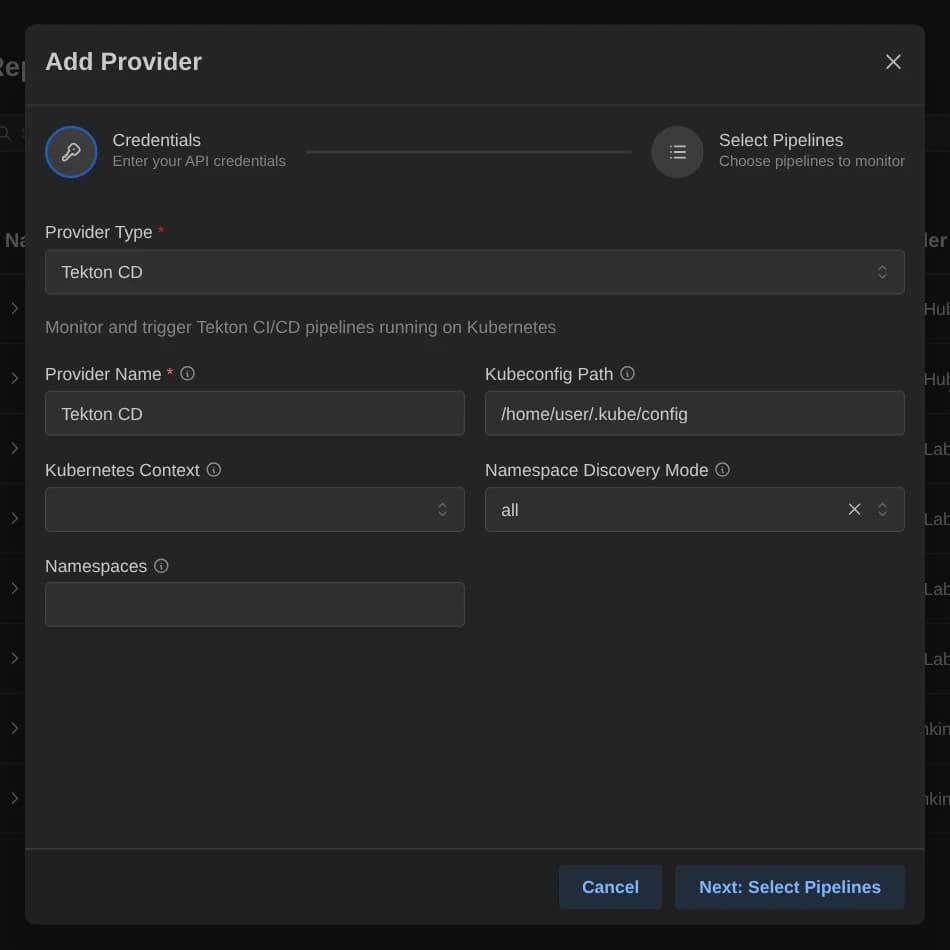
| Key | Type | Required | Default | Description |
|---|---|---|---|---|
kubeconfig_path | Text | No | $KUBECONFIG if set, else ~/.kube/config | Path to the Kubernetes config file or files. : separates several paths on Unix and ; on Windows. |
context | Select | No | None | A context from the kubeconfig. Empty uses the current context. |
namespace_mode | Select | No | all | How to find namespaces with Tekton pipelines. Options are all and custom. |
namespaces | Text | No | None | Comma-separated namespaces to monitor, for example default,prod,staging. Required when the mode is custom. |
Namespace names use lowercase letters, numbers and hyphens, at most 63 characters each.
Cluster connection
Tekton has no base URL. The kubeconfig supplies the cluster endpoint and credentials, and context picks which cluster entry to use.
Pipeline discovery
Namespaces come from namespace_mode. In all mode, Pipedash lists all namespaces and keeps those that contain Tekton pipelines. In custom mode, it uses the names in namespaces. Validation fails with a hint when it finds no pipelines. The picker shows the namespace as the organization. Pipedash shows the newest PipelineRun of each pipeline.
Trigger parameters
Pipedash reads the params of the Pipeline. Each one becomes a String field named after the param.
| Pipeline param | Trigger field |
|---|---|
Type string or no type | String, with the param's default when it is a string |
Type array | String, with the default rendered as JSON |
| Any other type | String, no default |
A field is required when the param has no default. On trigger, Pipedash creates a PipelineRun named <pipeline>-<unix timestamp> with these values as params.
Cancel
Cancel deletes the PipelineRun. Pipedash finds it by matching the run number against the creation time in seconds.
TOML example
No token is needed. Without selected_items, Pipedash monitors every pipeline in the namespaces from the configured mode.
[providers.tekton-prod]
name = "Tekton Prod"
type = "tekton"
refresh_interval = 30

[providers.tekton-prod.config]
kubeconfig_path = "~/.kube/config"
context = "prod-cluster"
namespace_mode = "custom"
namespaces = "default,prod,staging"
Status mapping
Pipedash reads the Succeeded condition of the PipelineRun.
| Pipedash status | Tekton state |
|---|---|
success | Succeeded is True |
failed | Succeeded is False with any reason except PipelineRunCancelled |
running | Succeeded is Unknown |
pending | No Succeeded condition, or any other value |
cancelled | Succeeded is False with reason PipelineRunCancelled |
skipped | Not produced by this plugin |