
GitLab CI
Monitoring of GitLab CI/CD pipelines in Pipedash on GitLab.com or self-hosted instances, with pipeline variables and run cancel.
The GitLab CI plugin (gitlab) monitors the latest pipeline of each selected GitLab project. It loads run history, starts pipelines on a ref and cancels running pipelines.
Requirements
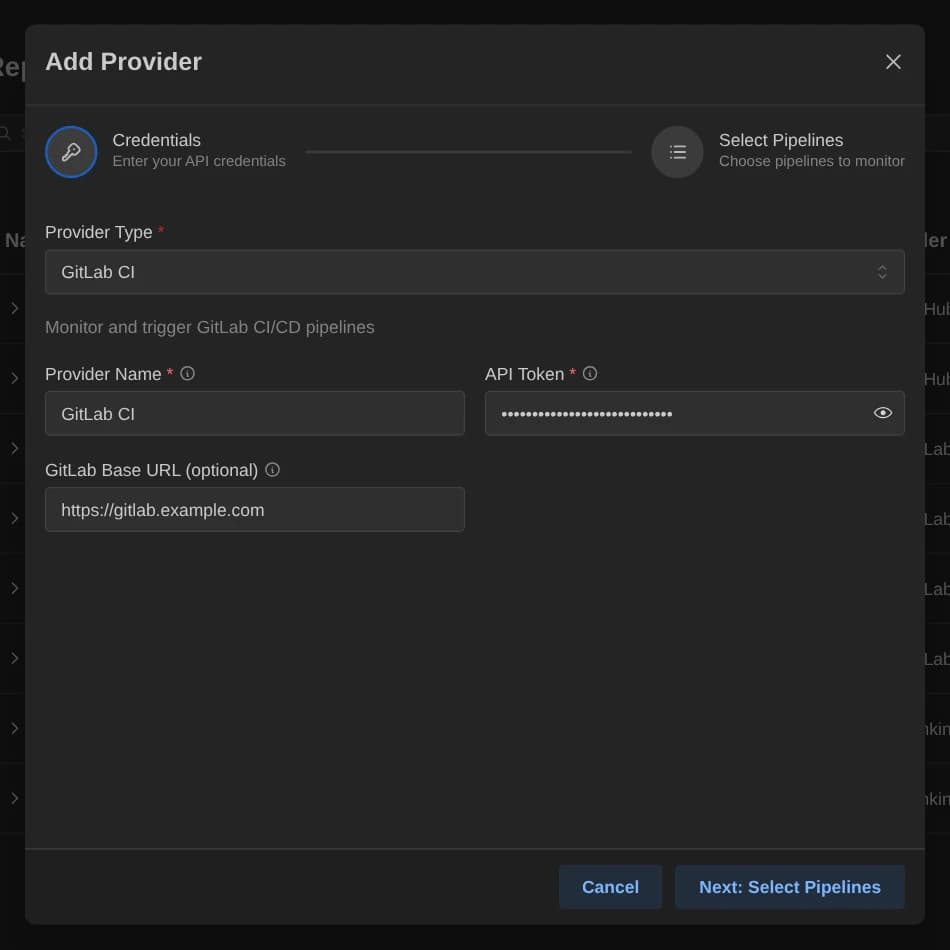
The plugin authenticates with a personal access token that has the api scope. GitLab has no optional scopes, so Pipedash has nothing else to check.
Configuration
| Key | Type | Required | Default | Description |
|---|---|---|---|---|
token | Password | Yes | None | GitLab personal access token with api scope. |
base_url | Text | No | None | Empty means GitLab.com. A self-hosted instance takes its GitLab URL, for example https://gitlab.example.com. |
The config table of the TOML file also takes selected_items, a comma-separated list of project paths such as platform/backend.
Base URL
An empty base_url means https://gitlab.com. Pipedash appends /api/v4, so https://gitlab.example.com becomes https://gitlab.example.com/api/v4. Self-hosted instances use the same two fields.
Pipeline discovery
Discovery lists the projects where the token owner is a member. The picker browses by the account of the token owner or by group, and searches by name. Pipedash shows the latest pipeline of each project in selected_items, or of all member projects when the key is absent. A project without pipelines shows as pending.
Trigger parameters
| Name | Type | Required | Default | Description |
|---|---|---|---|---|
ref | String | Yes | main | Branch, tag or commit SHA to run the pipeline on. |
variables | Object | No | None | Pipeline variables to set. Each entry is sent as an env_var variable, and a value that is not a string becomes an empty string. |
Cancel
Pipedash cancels the GitLab pipeline whose ID equals the run number.
TOML example
[providers.gitlab-internal]
name = "GitLab Internal"
type = "gitlab"
token = "${GITLAB_TOKEN}"
refresh_interval = 30

[providers.gitlab-internal.config]
base_url = "https://gitlab.company.com"
selected_items = "platform/backend,platform/frontend,infra/terraform"
Status mapping
| Pipedash status | GitLab state |
|---|---|
success | success |
failed | failed |
running | running, pending |
pending | Any other state, and projects with no pipeline |
cancelled | canceled |
skipped | skipped |